


Home › Guides › Sales Pipeline Stages
Last updated: October 29, 2026
TechCurato is reader-supported. Some links are affiliate links: we may earn a commission at no extra cost to you. Learn more.
Sales Pipeline Stages (2027): 7 Stages and How to Set Them Up
A sales pipeline breaks your selling process into stages so you can see where every deal stands. Most small businesses use five to seven stages: New lead, Qualified, Meeting, Proposal, Negotiation, Won and Lost. Each stage should have a clear exit rule, such as "budget and decision-maker confirmed", so everyone moves deals the same way. A CRM such as HubSpot (free for 2 users), Pipedrive or Zoho CRM turns these stages into a visual board.
- Five to seven stages fit most small teams.
- Each stage needs an exit rule that's easy to verify.
- Track conversion between stages and time spent in each stage.
- Every open deal needs a next step and a date.
- CRMs: HubSpot free for 2 users; Zoho free for 3; Pipedrive from about $14/seat *.

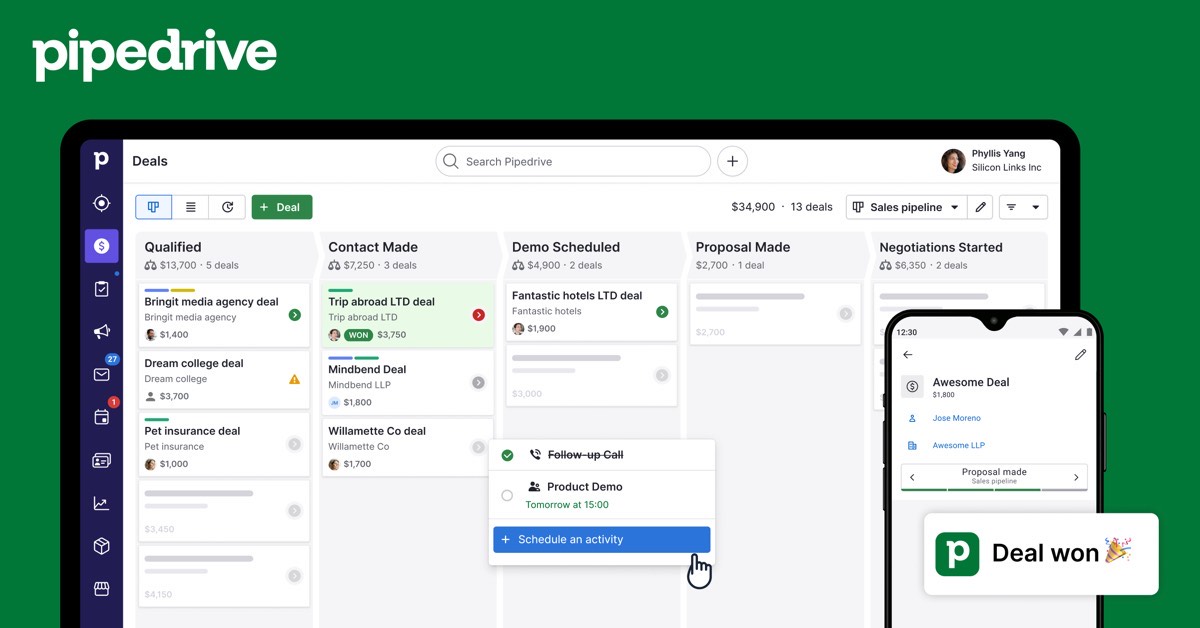

* From 2026 pricing guides.
The 7 common sales pipeline stages
| Stage | What it means | Exit rule (example) |
|---|---|---|
| 1. New lead | Someone showed interest or was identified | Contact details and source recorded |
| 2. Qualified | They have a need you can solve | Need, budget range and timing confirmed |
| 3. Meeting | A discovery call or demo took place | Problems and decision process understood |
| 4. Proposal | You sent a quote or proposal | Proposal sent with a follow-up date |
| 5. Negotiation | Terms are being discussed | Remaining objections listed |
| 6. Won | They signed or paid | Contract or payment received |
| 7. Lost | They said no or went silent | Reason recorded |
Adjust the names to your business. A service firm might use Brief received and Scope agreed; a SaaS company might use Trial started and Trial active.
Why exit rules matter
Without exit rules, one salesperson moves a deal to Proposal after a friendly call while another waits for a signed brief. Forecasts become unreliable and managers can't coach. Write each rule in one line and put it in your CRM's stage description.
Metrics to track at each stage
| Metric | What it tells you |
|---|---|
| Deals per stage | Where work piles up |
| Stage conversion rate | Share of deals that move to the next stage |
| Time in stage | Where deals stall |
| Pipeline value | Total value of open deals |
| Win rate | Share of qualified deals you win |
| Lost reasons | What to fix in your offer or process |
Review these monthly. A low conversion from Meeting to Proposal points to qualification problems; a long time in Negotiation points to pricing or approval issues.
How to set up your pipeline in a CRM
- Write your stages and exit rules on paper first.
- Create the pipeline in your CRM with those stages.
- Make "next step" and "next step date" required on open deals.
- Import open deals and assign each to a stage.
- Add one automation: a task when a deal enters Proposal.
- Review the pipeline weekly from the CRM dashboard.
CRMs that make pipelines easy
| CRM | Free plan | Entry paid price | Pipeline features |
|---|---|---|---|
| HubSpot | 2 users | Starter $7/seat (annual) | Drag-and-drop pipeline, deal stages, forecasting on Pro |
| Pipedrive | No | Lite about $14/seat * | Pipeline-first design, activity reminders |
| Zoho CRM | 3 users | Standard $14/user (US) * | Multiple pipelines from Standard |
| Salesforce | No | Starter Suite $25/user | Highly customizable stages |
| monday CRM | No | Basic €12/seat (3-seat minimum) | Visual boards linked to projects |
See what is a CRM and best CRM for small business.
Build your pipeline in HubSpot free → Free for 2 users, no credit card · Affiliate link
Multiple pipelines
Use separate pipelines when the process is truly different, for example new business versus renewals, or online sales versus wholesale. Don't create a pipeline per salesperson; use filters instead.
Common mistakes
- Too many stages, so deals rarely move.
- Stages named after internal steps customers never see.
- No lost reasons, so you can't learn from losses.
- Deals with no next step sitting in the pipeline for months.
- Inflated deal values that make forecasts useless.
Terms explained
- Pipeline: the stages deals move through.
- Deal: a potential sale with a value and stage.
- Conversion rate: the share of deals that move to the next stage.
- Win rate: the share of qualified deals you win.
- Forecast: expected revenue based on the pipeline.
Example pipelines for different businesses
| Business | Pipeline stages |
|---|---|
| B2B services | Lead, Qualified, Discovery call, Proposal, Negotiation, Won, Lost |
| SaaS (sales-led) | Lead, Demo booked, Demo done, Trial, Proposal, Won, Lost |
| Agency | Inquiry, Brief received, Scope agreed, Proposal sent, Signed, Lost |
| Wholesale | Prospect, Samples sent, Order quote, First order, Repeat buyer, Lost |
How to run a weekly pipeline review
- Sort open deals by expected close date.
- Check every deal has a next step and a date.
- Discuss deals that haven't moved in two weeks.
- Update stages and values together, from the CRM.
- Note lost reasons for deals that closed lost.
Keep the review to 30 minutes for a small team.
Calculating a simple forecast
Multiply each deal's value by a probability for its stage, then add them up. For example, deals in Proposal might count at 40% and deals in Negotiation at 70%. Adjust the percentages over time using your real win rates by stage. Many CRMs, including HubSpot Professional and Salesforce, calculate weighted forecasts automatically.
Signs your pipeline needs work
- Many deals stuck in one stage.
- Large deals with no recent activity.
- Win rates far lower than expected.
- Salespeople keeping a separate spreadsheet.
Pipeline stage template
| Stage | Exit criteria | Probability |
|---|---|---|
| Lead | Contact details and source recorded | 10% |
| Qualified | Need, budget and timing confirmed | 20% |
| Meeting | Discovery call held | 40% |
| Proposal | Proposal sent | 60% |
| Negotiation | Terms discussed | 80% |
| Won or lost | Contract signed or deal closed lost | 100% or 0% |
The probabilities are examples; set yours from your own win rates once you have enough deals.
Reviewing the pipeline weekly
Look at deals that haven't moved in two weeks, deals without a next step, and the total value in each stage. Clean up old deals so forecasts stay realistic. Pipedrive, HubSpot and Zoho CRM show these views on their entry plans.
Pipeline mistakes to avoid
- Too many stages, so reps don't know where a deal belongs.
- Stages named after your activities instead of the buyer's progress.
- Deals left open for months without a next step.
- No exit criteria, so every rep uses the stages differently.
Keep five to seven stages, define what moves a deal forward and review the pipeline every week.
Our verdict
Keep your sales pipeline to five to seven stages with clear exit rules, require a next step on every open deal and review conversion and time in stage every month. A free CRM such as HubSpot or Zoho is enough to run this for a small team.
How we compiled this guide
This guide reflects common B2B sales practice; CRM prices come from official pricing pages checked October 29 to 30, 2026, or 2026 pricing guides where marked. See also CRM implementation.
FAQ
What are the stages of a sales pipeline?
Commonly: New lead, Qualified, Meeting, Proposal, Negotiation, Won and Lost.
How many pipeline stages should I have?
Five to seven for most small businesses.
What is the difference between a sales pipeline and a sales funnel?
The pipeline tracks deals through your sales steps; the funnel describes how prospects narrow from awareness to purchase.
How do I know when to move a deal?
Use a written exit rule for each stage.
Which metrics matter most?
Stage conversion, time in stage, pipeline value and win rate.
Do I need a CRM for a pipeline?
A spreadsheet works at first; a CRM adds reminders, email logging and reports.
What is a weighted pipeline?
The total of deal values multiplied by the probability of winning at each stage.
Which CRM is best for managing pipeline stages?
Pipedrive for visual pipelines; HubSpot for a free start; Zoho CRM for a low price.
How many stages should a sales pipeline have?
Five to seven stages suit most small businesses; more stages make the pipeline harder to keep up to date.
What are exit criteria?
The conditions a deal must meet before it moves to the next stage, such as a confirmed budget or a sent proposal.
Sources
Official pricing pages of HubSpot, Salesforce and monday CRM, checked October 29 to 30, 2026; Pipedrive and Zoho CRM from 2026 pricing guides.