


Home › Guides › Kanban vs Scrum
Last updated: October 29, 2026
TechCurato is reader-supported. Some links are affiliate links: we may earn a commission at no extra cost to you. Learn more.
Kanban vs Scrum (2027): Differences and Which One to Use
Kanban and Scrum are both agile ways to manage work, but they organize it differently. Scrum runs in fixed sprints of usually one to four weeks, with defined roles (Product Owner, Scrum Master, Developers) and planned meetings. Kanban has no sprints: work flows continuously across a board, and the main rule is to limit how much work is in progress at once. Choose Scrum when you build a product in planned increments; choose Kanban when requests arrive continuously, as in support, operations, marketing or agency work.
- Scrum: fixed-length sprints, three roles, sprint planning, daily stand-up, review and retrospective.
- Kanban: continuous flow, work-in-progress (WIP) limits, no required roles or sprints.
- Scrum measures velocity and sprint goals; Kanban measures cycle time and throughput.
- Many teams mix them ("Scrumban").
- Trello, ClickUp, Asana and monday.com all support Kanban boards; ClickUp, monday.com and Asana also support sprints.

Kanban vs Scrum at a glance
| Kanban | Scrum | |
|---|---|---|
| Cadence | Continuous flow | Fixed sprints (usually 1 to 4 weeks) |
| Roles | None required | Product Owner, Scrum Master, Developers |
| Planning | As work arrives, by priority | Sprint planning at the start of each sprint |
| Changes mid-cycle | Allowed at any time | Avoided during a sprint |
| Main limit | Work in progress per column | Work committed to the sprint |
| Key metrics | Cycle time, throughput | Velocity, sprint goal completion |
| Best for | Support, operations, marketing, agencies | Product and software development |
How Kanban works
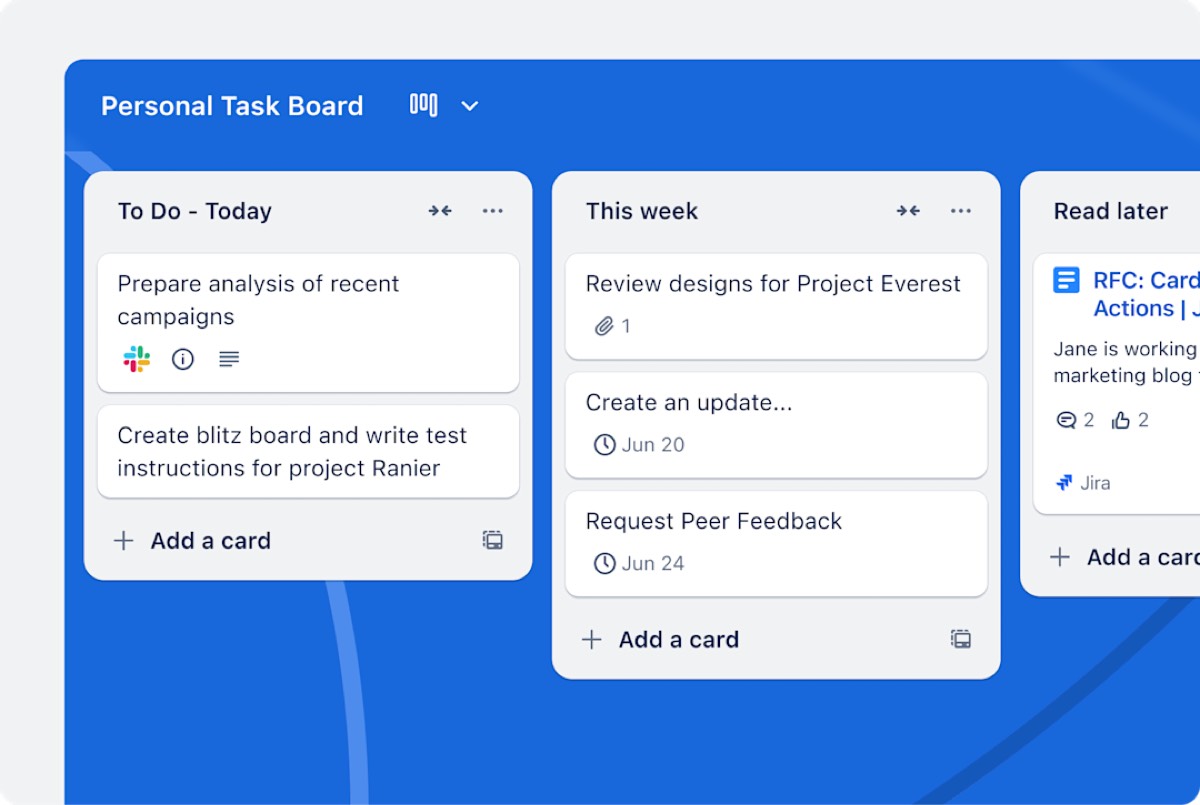
A Kanban board shows work as cards moving through columns such as To do, In progress, Review and Done. The core practice is the work-in-progress limit: each column can hold only a set number of cards, so the team finishes work before starting more. When a card leaves a column, space opens for the next one. Teams improve the system by watching where cards pile up and fixing that bottleneck.
Kanban has no required meetings, but many teams hold a short daily check-in at the board and a regular review of flow. Because nothing is locked into a sprint, urgent work can be pulled in at any time, as long as it respects the WIP limits.
How Scrum works
Scrum organizes work into sprints. At sprint planning, the team chooses items from the product backlog and commits to a sprint goal. During the sprint, a short daily stand-up keeps everyone aligned. At the end, the sprint review shows what was built and the retrospective looks at how to work better. The Product Owner manages priorities, the Scrum Master removes obstacles and protects the process, and the Developers deliver the work.
Scrum's rhythm helps teams that build something complex in steps, because each sprint ends with a usable increment and a chance to adjust the plan.
The main differences in practice
Planning and commitment
Scrum asks the team to commit to a set of work for the sprint. Kanban asks the team to pull the next most important item when it has capacity. Scrum suits work you can plan two weeks ahead; Kanban suits work you can't predict.
Change
In Scrum, new requests usually wait for the next sprint unless they're critical. In Kanban, priorities can change daily. A support or agency team that receives urgent client requests every day will find Kanban less disruptive.
Metrics
Scrum teams track velocity, the amount of work they finish per sprint, to forecast future sprints. Kanban teams track cycle time, how long a card takes from start to finish, and throughput, how many cards finish per week. Both help you predict delivery; they measure different things.
Roles
Scrum defines three roles. Kanban adds none, so it's easier to introduce into an existing team without reorganizing it.
When to use Kanban
- Customer support, IT and operations teams with a steady stream of requests.
- Marketing teams producing content continuously.
- Agencies juggling many small client requests.
- Teams that want to improve an existing process without new roles or meetings.
When to use Scrum
- Software and product teams building features in increments.
- Teams that benefit from a fixed rhythm of planning and review.
- Projects where stakeholders want regular demos of progress.
- New teams that need structure to learn to work together.
Scrumban: mixing both
Many teams combine the two. They keep Scrum's planning and retrospectives but use a Kanban board with WIP limits during the sprint, or they run Kanban with a regular planning meeting. If neither pure method fits, start with Kanban's board and WIP limits and add the Scrum meetings your team finds useful.
Tools that support Kanban and Scrum
| Tool | Kanban boards | Sprints | Free plan | Entry paid price (annual) |
|---|---|---|---|---|
| Trello | Yes, core feature | Via Power-Ups | 10 collaborators | Standard $5/user |
| ClickUp | Yes | Yes | Free Forever | Core $9/user |
| Asana | Yes | Yes (boards and timelines) | 2 users | Starter $10.99/user |
| monday.com | Yes | Yes | 2 seats | Basic $9/seat (3-seat minimum) |
| Notion | Yes (database boards) | Light | Individuals | Plus $10/seat (monthly price) |
Trello is the simplest pure Kanban tool; ClickUp and monday.com cover both methods with sprints, dashboards and automation. See Trello vs ClickUp and best project management software for small teams.
Try ClickUp Free Forever → Kanban boards and sprints in one tool · Affiliate link
How to start with Kanban in one week
- Draw your workflow as columns, from request to done.
- Put every current task on the board as a card.
- Set a WIP limit for each "in progress" column, roughly one or two items per person.
- Hold a 10-minute check-in at the board each morning.
- At the end of the week, look at where cards waited longest and fix that step.
How to start with Scrum
- Name a Product Owner and a Scrum Master.
- Build a product backlog and order it by value.
- Choose a sprint length, usually two weeks.
- Run sprint planning with a clear sprint goal.
- Hold daily stand-ups, a sprint review and a retrospective.
Common mistakes
- Running Scrum without a real Product Owner, so priorities change mid-sprint.
- Using a Kanban board without WIP limits, which turns it into a to-do list.
- Using velocity to compare teams; it's a planning tool, not a score.
- Adding every Scrum meeting to a team that only needs a simple flow.
Terms explained
- Sprint: a fixed period in Scrum during which the team delivers committed work.
- WIP limit: the maximum number of items allowed in a Kanban column.
- Backlog: an ordered list of work waiting to be done.
- Velocity: the amount of work a Scrum team completes per sprint.
- Cycle time: how long one item takes from start to finish.
A quick way to decide
If your work arrives unpredictably and priorities change daily, start with Kanban. If you build a product in planned increments and can protect two weeks from interruptions, try Scrum. Review the choice after a quarter.
Our verdict
Use Scrum when you build a product in planned increments and benefit from a fixed rhythm. Use Kanban when work arrives continuously and priorities change often. If you're unsure, start with a Kanban board and WIP limits, which take an afternoon to set up in Trello or ClickUp, and add Scrum's planning and retrospectives if your team needs more structure.
How we compiled this guide
This guide summarizes standard Scrum and Kanban practice as used by software and business teams. Tool prices come from official pricing pages, checked October 29, 2026. See also Asana vs monday.com and best project management software for agencies.
FAQ
What is the main difference between Kanban and Scrum?
Scrum works in fixed sprints with set roles and meetings; Kanban is a continuous flow with limits on work in progress.
Is Kanban agile?
Yes. Kanban is an agile method focused on flow and continuous improvement.
Which is better for small teams?
Kanban is usually easier to adopt for small teams because it needs no new roles or meetings.
Can you use Kanban and Scrum together?
Yes. Many teams use Scrumban: Scrum's planning and retrospectives with a Kanban board and WIP limits.
What tools support Scrum?
ClickUp, monday.com and Asana support sprints; Trello supports them with Power-Ups.
Do Kanban teams have deadlines?
They can. Kanban doesn't use sprints, but individual items can still have due dates.
Sources
The Scrum Guide (scrumguides.org) for Scrum roles and events; official pricing pages of Trello, ClickUp, Asana, monday.com and Notion, checked October 29, 2026.