


Home › Guides › CRM Implementation
Last updated: October 29, 2026
TechCurato is reader-supported. Some links are affiliate links: we may earn a commission at no extra cost to you. Learn more.
CRM Implementation (2027): A 30-Day Plan for Small Teams
A successful CRM implementation for a small business takes about a month and follows six steps: set goals, map your sales process, clean your data, configure the CRM, connect email and key tools, and train the team with a few simple rules. Most failed implementations fail on adoption, not software, so keep the first version simple and make the CRM the only place where deals are tracked.
- Typical small-team timeline: about 30 days from decision to daily use.
- Biggest risk: low adoption by salespeople.
- Clean data before importing; duplicates multiply after import.
- Start with 5 to 7 pipeline stages.
- Onboarding fees exist on some plans (HubSpot Sales Hub Professional $1,500).


Week 1: Goals and process
Set two or three goals
Write down what the CRM should improve, for example "no lead goes unanswered for more than 24 hours" or "forecast next month's revenue within 10%". Goals tell you which features matter and how to measure success.
Map your sales process
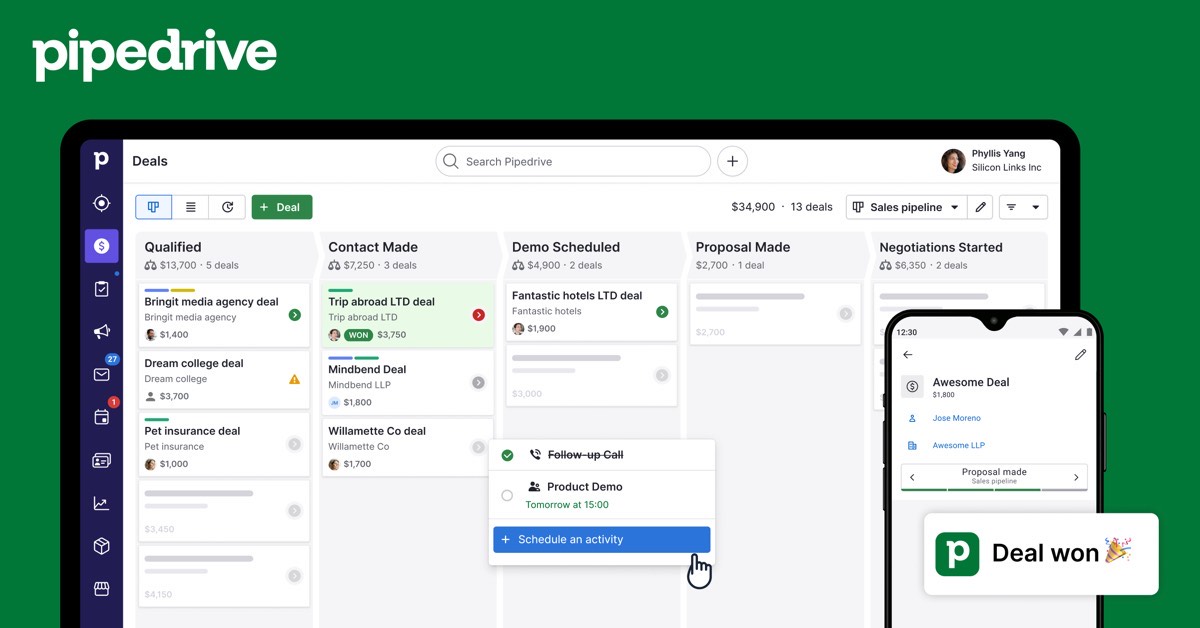
Draw the stages a deal moves through, from first contact to won or lost. Five to seven stages is enough for most small teams, for example New lead, Contacted, Meeting, Proposal, Negotiation, Won, Lost. Define what must be true to move a deal to each stage.
Choose the CRM
Match the CRM to your process and budget:
| CRM | Free plan | Entry paid price | Good fit |
|---|---|---|---|
| HubSpot | 2 users | Starter $7/seat (annual) | Most small teams |
| Zoho CRM | 3 users | Standard $14/user (US) * | Customization on a budget |
| Pipedrive | No | Lite about $14/seat * | Pipeline-driven sales |
| Salesforce | No | Starter Suite $25/user | Growth into enterprise |
| monday CRM | No | Basic €12/seat (3-seat minimum) | Sales plus delivery |
* From 2026 pricing guides. See how to choose a CRM and best CRM for small business.
Week 2: Data cleanup and import
- Gather contacts from email, spreadsheets, old CRMs and business cards.
- Remove duplicates and contacts with no useful information.
- Standardize fields: company names, countries, phone formats.
- Decide which fields you really need; fewer is better.
- Import a test batch of 50 records, check them, then import the rest.
- Add every open deal with a value, stage and next step.
Week 3: Configuration and integrations
- Create the pipeline stages and required fields.
- Connect each person's email and calendar so conversations log automatically.
- Set up two or three automations, such as assigning new leads or creating a follow-up task when a deal moves.
- Connect key tools: website forms, email marketing, accounting or support.
- Build one dashboard with pipeline value, deals won and activities.
Week 4: Training and launch
Train everyone in a one-hour session focused on daily use: adding a deal, logging a call, moving a stage and checking tasks. Agree on three rules:
- If it isn't in the CRM, it didn't happen.
- Every open deal has a next step and a date.
- Pipeline reviews happen from the CRM dashboard, not a spreadsheet.
Then switch off the old spreadsheet so there's only one source of truth.
What CRM implementation costs
| Cost | Small team example |
|---|---|
| Licences | $0 to $25 per user per month at entry level |
| Onboarding fees | $0 on most entry plans; $1,500 on HubSpot Sales Hub Professional |
| Internal time | About 20 to 40 hours over a month for a small team |
| Partner help | Optional; common for Salesforce and complex Zoho setups |
Start HubSpot's free CRM → Free for 2 users, no credit card · Affiliate link
Measuring success after 90 days
Check whether the goals you set in week 1 improved: response time to new leads, accuracy of forecasts, and the share of deals with a next step. Also check adoption: how many people log activities daily. If adoption is low, simplify fields and stages rather than adding features.
Common implementation mistakes
- Copying every field from the old spreadsheet.
- Too many pipeline stages and required fields.
- Importing dirty data.
- Launching without email integration, so people keep working in their inbox.
- Keeping the old spreadsheet alive in parallel.
- Buying an enterprise edition before the basics work.
Terms explained
- Pipeline: the stages a deal moves through.
- Deal: a potential sale tracked in the CRM.
- Required field: a field that must be filled to save or move a record.
- Integration: a connection between the CRM and another tool.
- Adoption: how consistently the team uses the CRM.
Example rollout for a 6-person sales team
In week 1, the sales lead writes three goals (reply to every inbound lead within a day, track every deal with a next step, forecast monthly revenue) and draws a six-stage pipeline. In week 2, the team merges duplicates from three spreadsheets and imports 1,200 contacts and 45 open deals into HubSpot's free CRM, upgrading to Starter seats for sequences. In week 3, everyone connects email and calendar, and two automations go live: new form leads are assigned round-robin, and a follow-up task is created when a deal reaches Proposal. In week 4, a one-hour training session covers daily use, and the spreadsheet is archived. After 90 days, the team reviews response times and pipeline accuracy.
Choosing who owns the CRM
Name one person as CRM owner. They decide on fields and stages, approve changes, keep data clean and run the weekly pipeline review. Without an owner, every user adds fields and the CRM becomes as messy as the spreadsheets it replaced.
What to configure later, not on day one
- Complex lead scoring.
- Many custom objects.
- Advanced forecasting models.
- Dozens of automations.
Add these once the team uses the basics every day and you know which problems they solve.
Integrations worth connecting first
- Email and calendar, so conversations and meetings log automatically.
- Website forms, so new leads arrive in the CRM.
- Email marketing, so marketing and sales share contacts.
- Accounting or invoicing, if sales need to see payment status.
Getting sales reps to use the CRM
Adoption is the most common reason CRM projects disappoint. Make the CRM the only place where deals are discussed in pipeline meetings, so updating it becomes part of the job. Remove fields nobody uses, connect email and calendar so activities log automatically, and give reps a mobile app for updates after meetings. Ask reps after the first month what slows them down and fix it quickly; small changes show the team that the system is built for them.
Budgeting time for implementation
Plan for setup, data import, training and a few weeks of adjustment. Small teams often get started within weeks; larger ones with custom fields and integrations take longer.
Our verdict
A small-team CRM implementation succeeds when it's simple: clear goals, a short pipeline, clean data, email integration and three firm rules. Start with a free or entry plan such as HubSpot or Zoho, launch within a month, and add automation only after the team uses the basics every day.
How we compiled this guide
This plan reflects common CRM rollout practice for small teams; CRM prices come from official pricing pages checked October 29 to 30, 2026, or from 2026 pricing guides where marked with *. See also CRM data migration and how much does a CRM cost.
FAQ
How long does CRM implementation take?
For a small team, about a month; larger organizations can take several months.
What is the most important step?
Adoption: making the CRM the only place where deals are tracked.
Do I need a consultant?
Not for most small teams on HubSpot, Pipedrive or Zoho. Complex Salesforce setups often use partners.
How many pipeline stages should we have?
Five to seven for most small teams.
What should we automate first?
Lead assignment and follow-up tasks.
How do we get salespeople to use the CRM?
Connect their email, keep fields minimal, and run pipeline reviews from the CRM.
What should we migrate into the new CRM?
Active contacts, companies and open deals first; archive old, incomplete records. See CRM data migration.
Who should own the CRM implementation?
One person, usually a sales manager or operations lead, who makes decisions on fields, stages and access and keeps the project moving.
Should we customize the CRM before launch?
Only what you need to start: pipeline stages, a few custom fields and user roles. Add more after the team has used it for a month.
Sources
Official pricing pages of HubSpot, Salesforce and monday CRM, checked October 29 to 30, 2026; Zoho CRM and Pipedrive prices from 2026 pricing guides.