


Home › Guides › What Is a CRM? Simple Definition, Examples & Costs
Last updated: October 29, 2026
TechCurato is reader-supported. Some links are affiliate links: we may earn a commission at no extra cost to you. Learn more.
What Is a CRM? A Simple Definition, Real Examples and What It Costs
A CRM (customer relationship management) system is software that stores every customer, lead, deal and conversation in one place, so your team knows who to contact, what was said and what to do next. Instead of spreadsheets, sticky notes and scattered inboxes, a CRM gives you one shared record per customer and a pipeline that shows where every deal stands. Good CRMs start free: HubSpot's CRM is free for 2 users and Zoho CRM for 3.
- CRM stands for customer relationship management.
- Core job: one record per contact, a sales pipeline, and reminders for the next step.
- Free options: HubSpot (2 users), Zoho CRM (3 users).
- Paid entry prices: HubSpot Starter $7/seat, Pipedrive Lite about $14/seat, Salesforce Starter Suite $25/user (annual billing).
- Typical users: sales teams, agencies, consultants, service businesses.

What does a CRM actually do?
A CRM answers three questions for everyone on your team, at any moment:
- Who is this person? Name, company, contact details, how they found you, every email and call so far.
- Where does the deal stand? Which stage of your sales process it is in, its value and its expected close date.
- What happens next? The task, reminder or follow-up email that keeps the relationship moving.
Everything else a CRM does — reports, automation, email integration — exists to make those three answers faster and more reliable.
The main parts of a CRM
Contacts and companies
Every person and organization you deal with gets a record. The CRM links people to their company, so you can see everyone you know at a client and the full history of your relationship.
The sales pipeline
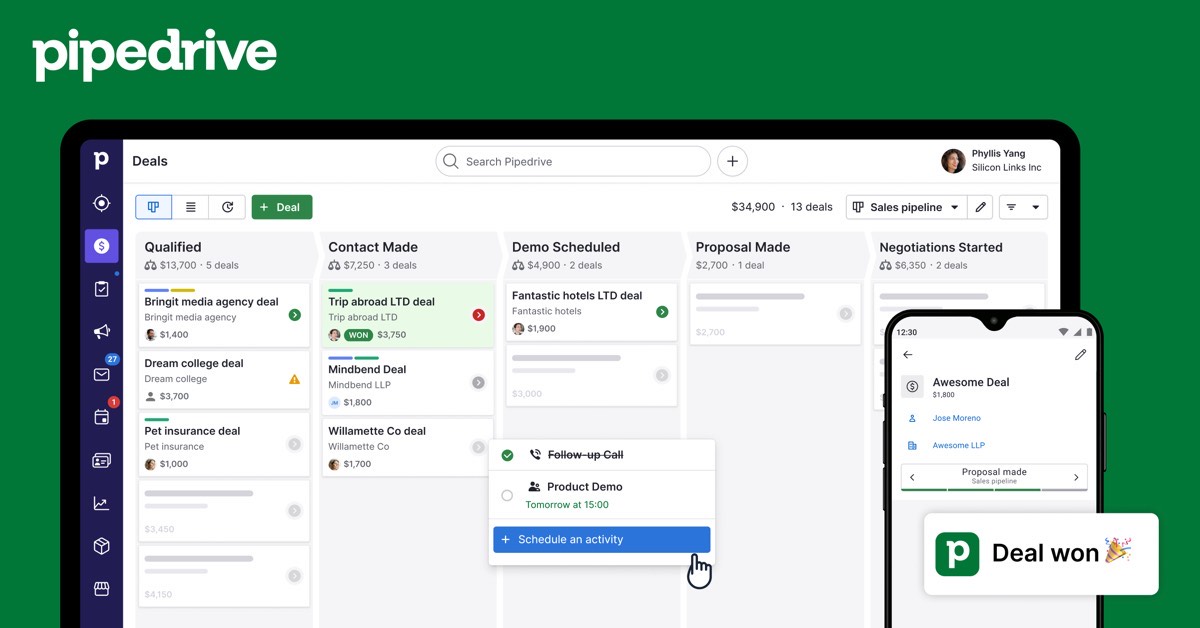
A pipeline is the list of stages a deal moves through, for example: New lead → Contacted → Meeting booked → Proposal sent → Won or Lost. Most CRMs show it as columns of cards you drag from left to right, which makes it easy to see what is stuck.
Activities and tasks
Calls, meetings, emails and notes are logged on the contact's record. Tasks and reminders make sure nobody forgets to follow up.
Email integration
Modern CRMs connect to Gmail or Outlook so emails are logged automatically. On some tools this is a paid feature: Pipedrive's email sync starts on its Growth plan, according to pricing guides.
Reports
Reports show how many deals you have at each stage, how much revenue is expected this month and which salespeople or channels perform best.
Automation
Automation handles repetitive steps: assigning new leads, creating a follow-up task when a deal moves stage, or sending a welcome email. Limits vary by plan.
Who needs a CRM?
You probably need a CRM if any of these are true:
- You lose track of who you promised to call back.
- Two people on your team have contacted the same lead without knowing it.
- You can't say how much revenue is likely to close this month.
- Customer information lives in several spreadsheets and inboxes.
- A salesperson leaving would take their customer knowledge with them.
A freelancer with ten clients can survive with a spreadsheet. A team of three or more selling to dozens of prospects usually cannot.
Types of CRM
| Type | What it focuses on | Example tools |
|---|---|---|
| Sales CRM | Pipelines, deals, follow-ups | Pipedrive, HubSpot Sales Hub, Salesforce |
| Marketing CRM | Contacts, email campaigns, automation | HubSpot Marketing Hub, ActiveCampaign, Brevo |
| All-in-one platform | Sales, marketing and service on one database | HubSpot, Salesforce, Zoho |
| Work-management CRM | Flexible boards linking sales to delivery | monday CRM |
| WordPress CRM | Contacts and email inside your website | FluentCRM |
What does a CRM cost?
| CRM | Free plan | Entry paid price (annual billing) | Notes |
|---|---|---|---|
| HubSpot | Yes, 2 users | $7/seat (Starter) | Professional: $90/seat + $1,500 onboarding |
| Zoho CRM | Yes, 3 users | about $14/user (Standard) * | Deep customization |
| Pipedrive | No (14-day trial) | about $14/seat (Lite) * | Email sync from Growth |
| monday CRM | No (trial) | 12/seat (Basic, 3-seat minimum) | Prices shown in EUR |
| Salesforce | No (trial) | $25/user (Starter Suite) | Full Sales Cloud from $195/user |
* From 2026 pricing guides.
For a team of 5, that ranges from $0 (HubSpot or Zoho free, if you fit their user limits) to $35 a month on HubSpot Starter, about $70 on Pipedrive Lite and $125 on Salesforce Starter Suite. See our detailed HubSpot pricing, Pipedrive pricing and Salesforce pricing guides.
Popular CRM examples
HubSpot
A free CRM for 2 users that grows into a full sales, marketing and service platform. The easiest way to start without spending anything.
Pipedrive
A sales CRM built around a visual pipeline. Reps adopt it quickly. No free plan, but a 14-day trial.
Zoho CRM
Deep customization at a low price, free for 3 users, and part of the wider Zoho suite.
Salesforce
The most powerful and customizable CRM, used by large sales organizations. Starter Suite at $25 per user brings it within reach of small teams.
Start HubSpot's free CRM → Free for 2 users, no credit card
CRM vs spreadsheet
| Spreadsheet | CRM | |
|---|---|---|
| Cost | Free | Free to $25+/user to start |
| Shared history of every email and call | No | Yes |
| Reminders and tasks | Manual | Built in |
| Pipeline view | Manual | Built in |
| Reports | You build them | Built in |
| Works for 1 person, 10 clients | Yes | Yes |
| Works for 5 people, 200 leads | Hard | Yes |
How to set up your first CRM in one afternoon
- Define your pipeline stages. Five to seven stages that match how you actually sell.
- Import your contacts. Export them from your spreadsheet or email tool as CSV and import them.
- Connect your email. So conversations are logged automatically.
- Add your open deals. Each with a value, a stage and a next step.
- Set one rule for the team. For example: "every deal has a next task with a date". This habit matters more than any feature.
Common mistakes when adopting a CRM
- Choosing the most powerful tool instead of the one your team will use.
- Too many pipeline stages and custom fields on day one.
- No owner. Someone must keep the data clean.
- Not logging activities. A CRM is only as good as what goes into it.
- Paying for features you won't use for a year. Start on a free or entry plan.
How to choose a CRM
Read our step-by-step guide on how to choose a CRM and our ranking of the best CRM for small business. In short: start with how you sell, price the tool for your team in two years, and test it with real data during the trial.
Which CRM features you need by team size
| Team | Must-have | Nice to have | Can wait |
|---|---|---|---|
| 1–2 people | Contacts, pipeline, reminders | Email logging | Reports, automation |
| 3–10 people | Shared pipeline, email sync, tasks | Simple automation, basic reports | Forecasting |
| 10–50 people | Automation, reports, permissions | Forecasting, integrations | Custom objects |
| 50+ people | Forecasting, territories, admin controls | Custom objects, advanced security | — |
Buy for the row you will be in within 12 months, not three rows ahead.
CRM terms explained
- Lead: a person or company that might buy but hasn't been qualified yet.
- Contact: a person stored in the CRM.
- Deal (opportunity): a potential sale with a value and a stage.
- Pipeline: the stages a deal moves through until it is won or lost.
- Activity: a logged call, email, meeting or note.
- Seat: a paid user licence.
FAQ
What does CRM stand for?
Customer relationship management.
What is a CRM in simple terms?
A shared address book, deal tracker and to-do list for your customers, used by your whole team.
Is there a free CRM?
Yes. HubSpot's CRM is free for up to 2 users and Zoho CRM is free for up to 3 users.
What is the difference between a CRM and email marketing software?
A CRM manages relationships and deals one-to-one; email marketing software sends campaigns to many contacts. Some tools, such as HubSpot and ActiveCampaign, combine both.
Do small businesses need a CRM?
Once two or more people handle customers, a CRM usually saves time and lost deals. Free plans make it easy to try.
Sources
hubspot.com/pricing/sales, salesforce.com/sales/pricing, zoho.com/crm and monday.com/pricing, checked October 29, 2026. Pipedrive and Zoho paid prices from 2026 pricing guides.